CLI Quota Runs Out: Read Resets in and Sleep Until Reset

Translation jobs that run for days on account-level quotas are not about sending requests fast. They are about knowing when you have been stopped, how long to wait, and how to resume without duplicating or missing work.
1-minute summary
- Symptom / problem
- A large translation batch on Google's CLI hits the quota, which arrives as an error result with Resets in text rather than HTTP 429
- Who should read
- People running multi-day batch jobs on a per-account quota with a headless CLI
- Fix in short
- Split errors into three groups, parse the Resets in text, sleep until the reset, and keep job state on the server so a restart resumes without duplicates or gaps.
A client's website translation job, covering millions of characters, was consuming so much Claude usage that the weekly quota on the account I needed to reserve for a customer-facing chatbot was dropping unusually fast. I switched the translation engine to agy (Antigravity CLI), running Gemini on my own Google subscription, with no API key and no extra bill. To be precise, this is an official CLI that signs in with my own account, not a workaround using an unofficial API (the older Gemini CLI no longer accepts personal account sign-ins). I handled the sign-in myself in the browser window; I did not have Claude enter my password.
Its quota works differently from what I was used to. The quota is per account, shared across all models on that account, and when it runs out, it does not return a visible HTTP 429 like a typical API. It arrives as an error result buried in the turn output. That is why I needed a runner smarter than "send and retry."
Translation quality and a stuck queue are covered in [The website translation queue says nothing to send with thousands left](/article/llm-translate-site-stale-hash-code-checks-failed-cache). This article covers only long-running jobs under quota limits. For API rate throttling, see [batch API throttle](/article/batch-api-throttle-resume-verify), which is a different problem.
Three headless traps before getting a response
Before I reached the quota issue, I spent quite a while getting agy to respond without someone sitting at the screen. I found three traps and verified all three.
- Every flag must come before -p= If you write -p "text" followed by --flag, it treats the following flag as part of the prompt. The result is strange answers unrelated to what you sent.
- Run with an empty directory as cwd The agent tries to read files in the current directory, but headless mode automatically denies reads. The result is an empty response.
- stream-json stdin requires an event field Otherwise, it reports stream input message is missing the event field.
This is what a working command looks like. I use --mode plan to prevent file changes and also tell it in the prompt not to call tools. I run a single process for the English edition.
mkdir -p agy_ws && cd agy_ws          # โฟลเดอร์ว่างเท่านั้น
agy --input-format stream-json --output-format stream-json \
    --model <MODEL> --mode plan -p=   # -p= ต้องอยู่ท้ายสุด
The message sent through stdin is one line of JSON per turn. Unlike Claude's format, which I described in the Claude stream-json article, it requires "event".
{"event":"user","message":{"role":"user","content":[{"type":"text","text":"แปลเป็นอังกฤษ ห้ามใช้เครื่องมือ: ..."}]}}
On stdout, step_update events arrive along the way (agent_response content streamed as text_delta), and the turn ends with one {"event":"result"}, along with usage: input_tokens, cache_read_tokens, and output_tokens. I discard everything except result because it is the only event that tells me whether the turn succeeded.
Another thing to remember is that the system prompt is sent only on the first turn of a session, and the session restarts when accumulated context exceeds rotate_tokens, because input sent again on every turn also counts against Google's quota. The current default is 20,000 tokens (the old value in my code was 60,000), so I generally keep sessions short.

Quota failures arrive as an error result containing Resets in
When the account quota runs out, the turn does not fail with an HTTP status. Instead, result has a status other than SUCCESS, or the response is empty. The message inside also gives the time until reset, something like "Resets in 2h52m56s". I divide errors into three types.
Sign in again
The message says to sign in. The runner stops immediately and alerts someone. It must not sleep, because waiting will never fix this. A cheap check is the agy models command. If it returns Please sign in to view available models, the account is signed out.
Quota exhausted
The message contains quota, resource_exhausted, or limit, along with Resets in XhYmZs. The runner parses the time and sleeps until reset, with roughly 3 extra minutes as a buffer. It sends no retries while waiting.
The third type is RuntimeError for everything else. I make it fail loudly and stop, without silently retrying. I also learned this from Every layer reports success while the output is garbage.
import json, re

RESET = re.compile(r'Resets in\s*(?:(\d+)h)?\s*(?:(\d+)m)?\s*(?:(\d+)s)?')
MARGIN = 180          # เผื่อ 3 นาทีหลังเวลารีเซ็ต อย่ายิงทันทีที่ถึง

class SignedOut(Exception): pass
class QuotaStop(Exception):
    def __init__(self, wait): self.wait = wait

def seconds_until_reset(raw):
    m = RESET.search(raw)
    if not m or not any(m.groups()):
        # อ่านเวลาไม่ออก: ให้หยุดแล้วแจ้งคน ดีกว่าเดาแล้วยิงรัว
        raise RuntimeError('quota stop but no reset time: ' + raw[:200])
    h, mi, s = (int(x or 0) for x in m.groups())
    return h * 3600 + mi * 60 + s + MARGIN

def classify(result, answer):
    if result.get('status') == 'SUCCESS' and answer.strip():
        return answer
    raw = json.dumps(result, ensure_ascii=False)
    low = raw.lower()
    if 'sign in' in low or 'log in' in low:
        raise SignedOut(raw[:200])
    if any(k in low for k in ('quota', 'resource_exhausted', 'limit')):
        raise QuotaStop(seconds_until_reset(raw))
    raise RuntimeError(raw[:200])
I search the entire result text with a regex rather than targeting a specific field, because I do not want to depend on the location of the error message, which can easily change between tool versions.
Why it can always resume after sleeping: state lives on the server
My runner keeps no job state in the process at all. The server knows which fields are missing and which are stale (the API returns only what is missing), so resuming after sleep simply means fetching the queue again. If the process dies midway for any reason, I can run the same command again. There is no "state recovery" step.
Another trap for Windows users is that the foreground shell dies when it times out. A job sleeping for three hours in an SSH window will not survive. I therefore run it detached through a script that wraps the same command. I covered that in Running a job in a separate process through SSH on Windows. On Linux, it is much simpler.
#!/bin/bash
# run_phase.sh  รันแยกจาก shell เบื้องหน้า จะตายตอน SSH หลุดก็ไม่เป็นไร
cd "$(dirname "$0")" || exit 1
mkdir -p logs
nohup setsid python3 translate.py --locale en --engine agy \
    >> logs/en.log 2>&1 &
echo $! > logs/en.pid
I translate directly from Thai to English, without an intermediate language or multiple rounds of translation, because every extra step adds opportunities for distortion and uses more tokens.
Choose a model by measuring, not by its name
At first, I thought the larger model would always be better. But when I compared measurements on my own subscription, Flash at Low to Medium used around 1.1 output tokens per Thai character, while Pro at Low used around 3.9, mostly for thinking that did not appear in the response text. That means Flash produces around three and a half times as much text for the same quota. For translation work with a clear source text, I chose Flash.
These figures were measured on my own subscription and indicate the order of magnitude. I took the Pro figures from notes from an earlier measurement; they are not in this job's logs. As for model names, as of October 2026, the default in my code is gemini-3.8-flash-medium. Model names change very quickly. Anyone repeating the measurement should use their own account and their own real workload.
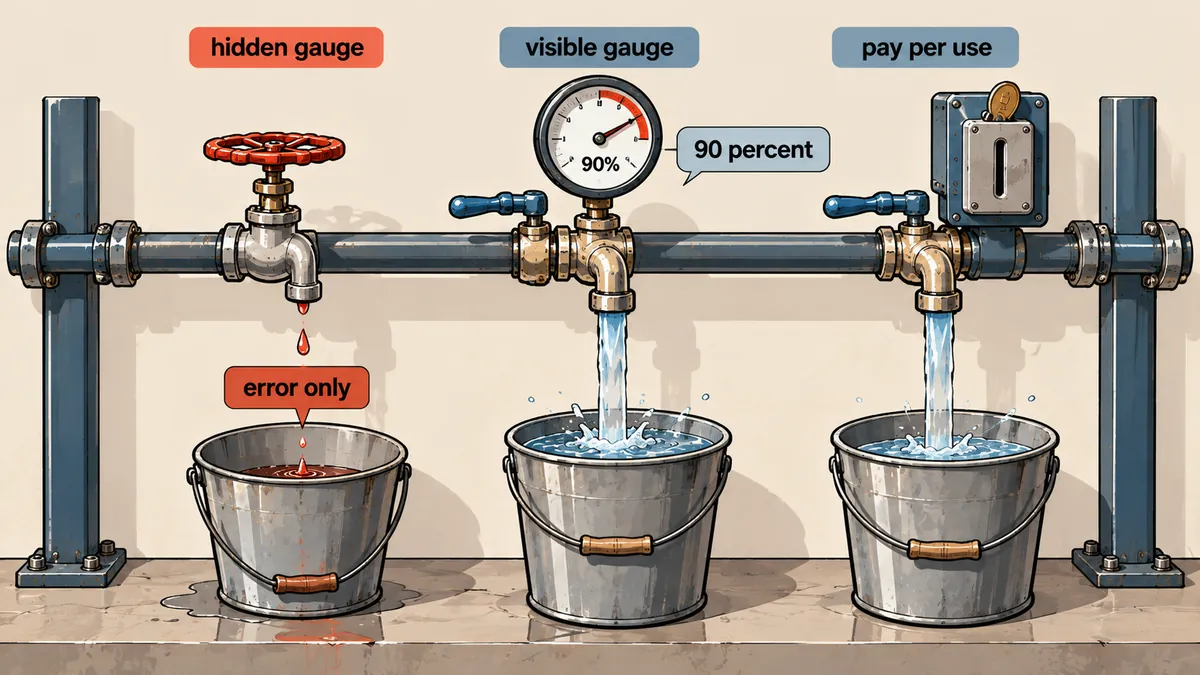
Comparing three quota models: how much can you know in advance?
What clarified things for me was that on Claude, I had a quota controller (QuotaGuard) that could read the account's usage level in advance. With Gemini through agy, that option does not exist. I only learn about the limit when I hit it.
On Claude, this controller reads weekly utilization (seven_day) and the 5-hour value from the account's usage endpoint before starting and every 5 turns, then stops at a default ceiling of 90%. An "endgame" mode raises the ceiling to 95% in the last few hours before the weekly reset, because any unused allowance would otherwise go to waste. It also keeps a token ledger for each 5-hour window. My conclusion is that, given a choice, a system that can read usage in advance is more predictable than one that must hit the limit first. But when there is no alternative, sleeping works well too. Whether to wait or switch engines is a matter of preference.
Wrap untrusted input in a sandbox
For my website translation job, the source text belongs to the client, so the risk is low. But if the input came from somewhere I did not control, such as external messages, I would wrap agy with bwrap, make HOME an empty tmpfs with only its own login directory exposed, and hide database sockets. An agent instructed to do something strange would then see only an empty box.
There is another observation in my usage notes that I have not checked again with this code: importing requests before calling truststore.inject_into_ssl() once caused a RecursionError on a network with TLS inspection. This observation is unconfirmed. If you encounter it, try switching the import order.
Test the runner without waiting for the quota to run out
I do not wait for the quota to actually run out to test it. I do two things: send one short turn to check that result matches the format the parser expects, and feed a simulated Resets in message into the time calculation function.
# จำลองข้อความโควตาหมด แล้วดูว่าเวลาหลับที่คำนวณถูกไหม
fake = 'RESOURCE_EXHAUSTED: quota reached. Resets in 2h52m56s'
assert seconds_until_reset(fake) == 2*3600 + 52*60 + 56 + 180   # = 10556 วินาที

try:
    classify({'status': 'ERROR', 'message': fake}, '')
except QuotaStop as e:
    print('sleep', e.wait, 'seconds')      # sleep 10556 seconds
A short turn returns result in the expected format; a simulated Resets in message produces the correct sleep duration; agy models returns a model list, meaning the account is still signed in; the job runs detached and survives closing the SSH window; and the number of missing fields on the server actually decreases after it has run for a while.
There are three things I would do the same way if I had to switch engines again. First, separate errors into three groups before writing anything else. Second, sleep for the time the system specifies instead of retrying. Third, always keep job state on the server, so restarting becomes routine and nothing to worry about. What I have not tried yet is running two jobs concurrently on the same account to see how they share the quota. I have only made a note of it; I have no numbers yet. I will come back and add them later.
Hit something like this? Stuck somewhere?
Come trade notes on the LinuxThai board



Comments 0
No comments yet — be the first