Samba Torrent Share: force user and the bind interfaces Trap

Sharing a folder between Windows and Linux is easy the first time you open it, but painful when files from each side have different owners and neither can delete the other's files. The short fix is to force every write through Samba to use the same user as the daemon.
1-minute summary
- Symptom / problem
- Sharing a download folder between Windows and Linux leaves files with different owners that cannot be deleted.
- Who should read
- Anyone setting up Samba on Debian to open a Transmission folder from Windows.
- Fix in short
- Use force user, force group and create mask so writes run as the daemon's user, and check the bind interfaces only line that is commented out.
I have a Debian server running transmission-daemon, downloading to a separate mounted disk, and I wanted Windows machines at home to see that folder as a network drive, with access to browse, rename, and delete files while Transmission could still manage those same files. With a basic Samba setup, files created from Windows and files created by Transmission have different owners, so neither side can delete or move the other's files. I wrote down the setup I use here; it is shorter than other articles because it is a practical recipe.
The folder name, share name, interface name, and IP in this article are all examples (/srv/downloads, Downloads, br0, 192.168.10.52). As for where to install it, if the machine is a VM host in production, Samba should run separately in a VM or LXC rather than on the hypervisor itself. That is general advice, not what I did in this case.
Why force user is needed
The problem is that Samba makes the logged-in user the owner of newly created files. Suppose I log in as media: files written from Windows will belong to media:media, while files downloaded by Transmission belong to debian-transmission. When Transmission tries to delete or move a file owned by media that I have just renamed, it cannot, and Windows cannot modify the daemon's files either.
The fix is force user and force group, which make all access through this share use debian-transmission at the filesystem level, along with create mask and directory mask to give both the user and group write permission on new files.
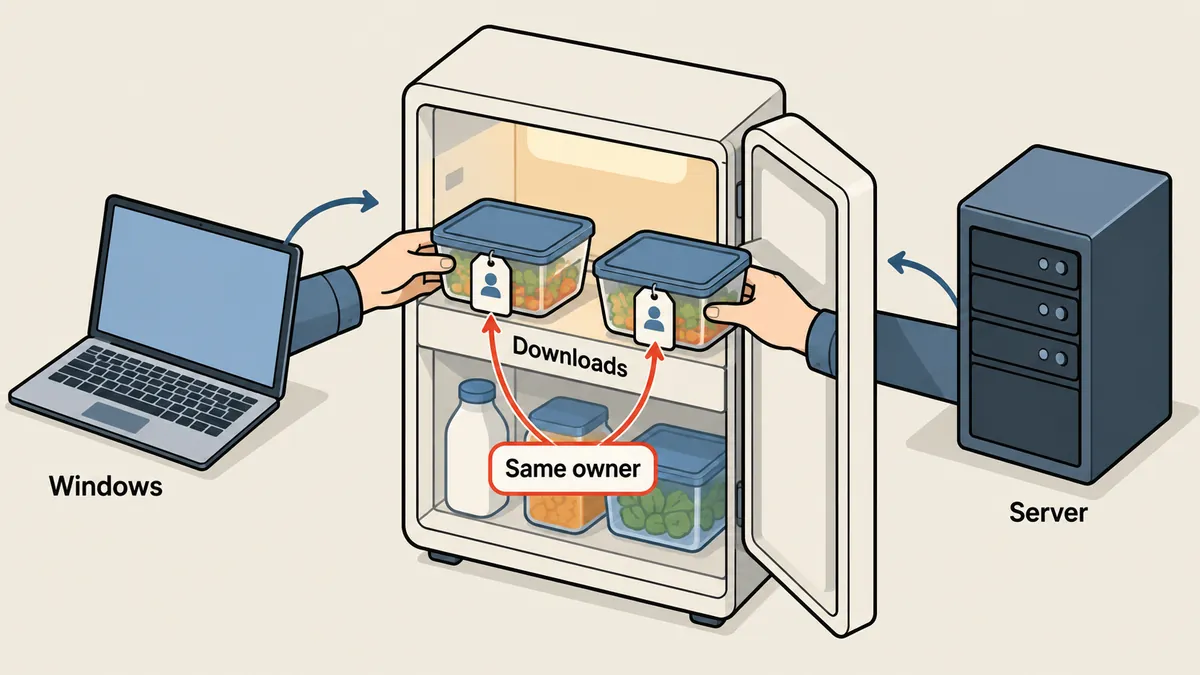
The config I use
Start by backing up the original file before every edit, because a bad Samba edit needs a way back.
sudo cp -a /etc/samba/smb.conf /etc/samba/smb.conf.orig-$(date +%Y%m%d)

# user สำหรับล็อกอิน share (ไม่มี shell ไม่มี home ใช้ได้แค่ผ่าน Samba)
sudo useradd -M -s /usr/sbin/nologin media
sudo smbpasswd -a media        # ตั้งรหัสของ Samba แยกจากรหัส Linux
[global]
   interfaces = lo br0
   bind interfaces only = yes
   server min protocol = SMB2
   map to guest = never
   # ...ค่า global อื่นที่มากับ Debian...

[Downloads]
   path = /srv/downloads
   valid users = media
   guest ok = no
   read only = no
   force user = debian-transmission
   force group = debian-transmission
   create mask = 0664
   directory mask = 0775
Going through the settings in groups: interfaces and bind interfaces only make Samba listen only on loopback and the LAN NIC. I put these two lines immediately after [global], which has a trap I will cover in the next section. server min protocol = SMB2 disables the old protocol, while map to guest = never and guest ok = no disable guest access entirely; logging in as media is required.
In the share, I use valid users = media, so only that user can log in, but every file write is forced to use debian-transmission through force user and force group. create mask = 0664 and directory mask = 0775 give new files created from Windows permissions that allow both the user and group to write. After editing the file, check the syntax before restarting.
testparm                       # ต้องไม่มี error และโชว์ Loaded services file OK
sudo systemctl restart smbd
I have not configured or checked which umask transmission-daemon uses when creating downloaded files itself. To make every file and directory created by Transmission match 0664 and 0775, check the daemon's settings separately. In this case, I rely only on files from both sides having the same user as their owner, which force user already provides.
On Windows: map a persistent drive
On Windows, save the credentials with cmdkey, then map the share to a drive letter. Add /persistent:yes to restore it after a reboot. This example uses <secret> in place of the actual password.
cmdkey /add:192.168.10.52 /user:media /pass:<secret>
net use Z: \\192.168.10.52\Downloads /persistent:yes
dir Z:\
If a file is created from Windows and then inspected on the server, its owner should be debian-transmission, as enforced by force user, rather than media.
ls -l /srv/downloads | head
# -rw-rw-r-- 1 debian-transmission debian-transmission ... ไฟล์ที่สร้างจาก Windows
Trap one: a commented-out bind interfaces only line
The machine has several NICs: one connects to the LAN, while another is for management or a modem connection. I wanted Samba to listen only on the LAN NIC, so I set interfaces and bind interfaces only, with the requirement that this must not leave a security hole. If the machine has a public IP or a NIC connected directly to the internet, that path should also be blocked with an additional firewall layer; that is general advice.
The trap I actually ran into was that Debian's default smb.conf already contains a line like this:
; bind interfaces only = yes
That line is commented out with ;. I had an installation script that checked whether the line already existed before adding the setting, using a grep pattern that was not anchored to the start of the line. It found the commented-out line, assumed the setting was already there, and skipped adding it. As a result, Samba was not actually bound to the specified interfaces, and no error reported this.
The fix has two parts: check with a pattern anchored to the start of the line that excludes commented-out lines, and check the configuration Samba actually reads rather than just inspecting the file.
# ผิด: เจอบรรทัดที่ถูกคอมเมนต์ด้วย เลยนึกว่ามีแล้ว
grep -q 'bind interfaces only' /etc/samba/smb.conf && echo "มีแล้ว (หลอก)"

# ถูก: นับเฉพาะบรรทัดที่ไม่ใช่คอมเมนต์
grep -Eq '^[[:space:]]*bind interfaces only' /etc/samba/smb.conf && echo "มีจริง"

# พิสูจน์ด้วยค่าที่ Samba ใช้จริง (รันหลัง restart)
testparm -s 2>/dev/null | grep -iE 'bind interfaces|interfaces ='

# พิสูจน์ว่า smbd ฟังที่ไหนบ้าง
sudo ss -ltnp | grep smbd
The last line is the check I trust most, because it shows what the system is actually listening on. If smbd listens on 0.0.0.0:445, it is still not bound to the specified interfaces; only seeing the LAN IP and loopback counts as correct. This ss step is a general verification method that I recommend testing on your own machine too. I put the new lines immediately after [global] to keep them from getting mixed in with the existing commented-out lines farther down.
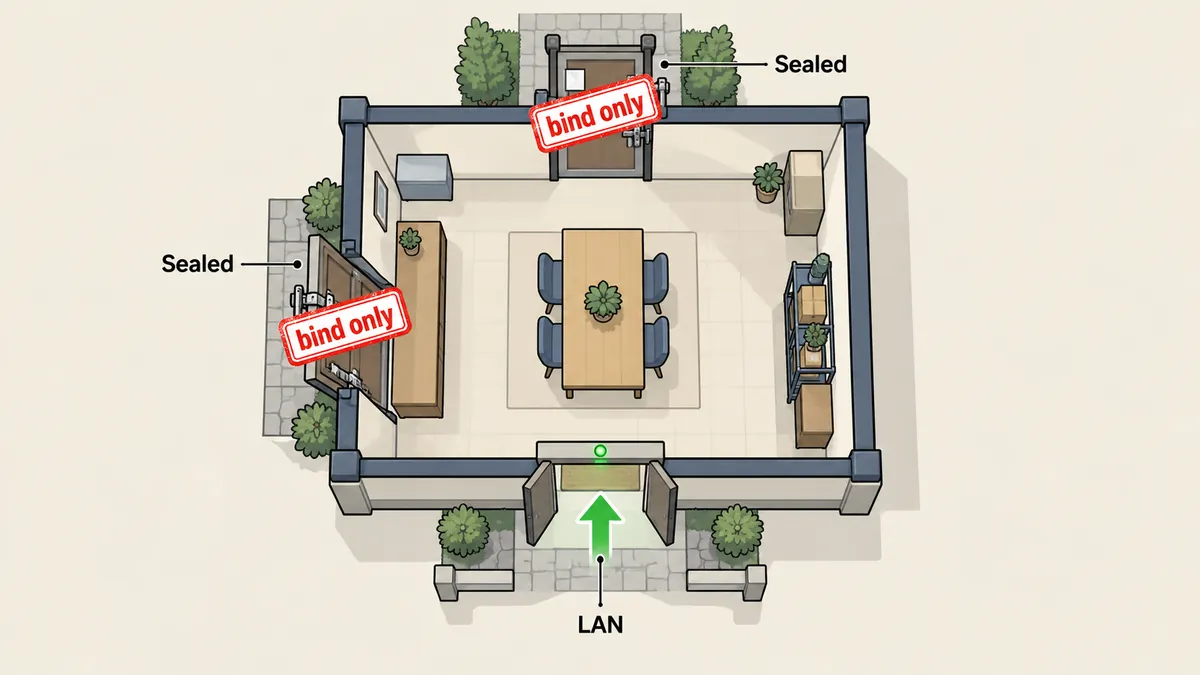
Commented-out example settings in default files can fool grep whenever the pattern is not anchored to the start of the line. Whenever an installation script will "add if missing," also check the results with testparm -s or ss, rather than trusting only grep's output from the file.
How to read the masks, and what force user costs
The numbers 0664 and 0775 represent Linux permissions in three sets, ordered by owner, group, and others, where 6 means read and write, 7 means read, write, and execute or enter a directory, and 4 means read only. New files therefore get rw-rw-r--, while new directories get rwxrwxr-x. Directories need x because without x, they cannot be entered. The key point is that both the owner and group can write, so even someone who later switches to another user in the same group can still modify the files. Others outside the group can only read.
There are two costs to force user worth knowing before choosing it. First, every write through this share is attributed to debian-transmission at the filesystem level. To find out who created or deleted a file, I have to check Samba's own logs, because the filesystem does not retain the logged-in user's name. Second, everyone listed in valid users always has the daemon's permissions. I currently allow just one user, media, so this is not a problem, but if I later add several people and want some to have read-only access, I will need a separate share with read only = yes rather than mixing them into this one.
Other options I know of are using POSIX ACLs to assign permissions per user on the folder, or periodically running chown afterward. I did not choose them because ACLs add another layer of complexity for a folder used by one person, and running chown afterward requires someone to remember to run it. force user resolves the problem at the source with a one-time setup. Anyone with several users on the machine who need different permissions should look into ACLs instead.
Checks before calling it done
- Run
testparm; there must be no warnings about unknown settings, and the configured share name must appear. - Run
testparm -s | grep -i bind; it must showbind interfaces only = Yesfrom Samba's actual interpretation of the configuration. - Run
ss -ltnp | grep smbd; it must not show0.0.0.0:445. - Map the drive from Windows and create a test file, then check
ls -lon the server; the owner must bedebian-transmission. - Try deleting the same file through Transmission or as the daemon's user; deletion must work, and deleting a file created by Transmission from Windows must work too.
Basic Samba
- Files owned by the logged-in user
- Neither side can delete the other's files
- Listens on every NIC on the machine
- Requires repeated chown runs afterward
force user + bind
- Files owned by the daemon's user
- Both sides can modify and delete
- Listens only on lo and LAN
- Actual behavior can be checked with ss
Before wrapping up, there is some Windows behavior that can be confusing when changing the config. If drive Z: is already connected when I edit smb.conf, the existing session retains the old settings. Testing after an edit requires disconnecting the old session first (net use Z: /delete) and then mapping the drive again; otherwise, it looks as though the change did not work when the connection simply has not been renewed. Another point is that after changing the password with smbpasswd, the saved credentials must be deleted with cmdkey /delete:192.168.10.52 and added again. Otherwise, Windows keeps sending the old password until the account locks or repeated access-denied messages appear. Both points are general network-drive behavior, not specific to this case.
What I did not test
I did not measure file transfer performance, try macOS or Linux as clients, or test with Windows 11 after manually disabling SMB1. What I recorded is that my Windows machine connected using SMB2 or later without guest access. Anyone applying this recipe to other clients will need to test them. More detailed file permission setups, such as using POSIX ACLs instead of force user, are another option I did not choose in this case. If I missed an explanation or made a typo, I will come back and correct it later.
Want us to set this up?
Get help with server setup, configuration, migration, or troubleshooting. Save time for the work that matters.
Hit something like this? Stuck somewhere?
Come trade notes on the LinuxThai board

Comments 0
No comments yet — be the first