Demucs + Whisper: One GPU Job with SHA-256 Transfer Checks

A job that takes several minutes on a GPU machine should finish in one run and support reruns without repeating work. I made every step skippable when its results already exist, and required proof that every file copied back matches its source byte for byte.
1-minute summary
- Symptom / problem
- The old script loops over the whole music library and risks redoing finished work when only one file is needed.
- Who should read
- People running Demucs and Whisper on a remote GPU machine.
- Fix in short
- Run as a single job, check SHA-256 before using the GPU, skip steps that already have results, and pull back only 7 files verified by size and SHA-256.
I had an experimental song that was 280.85 seconds long (4 minutes 41 seconds) and wanted the start and end times of vocal phrases, along with rough beat timing, to plan the edit. My main machine did not have enough GPU capacity for transcription, so I sent the job to a separate GPU machine. The problem was that my existing script was written to loop through every song in the library. Running it as-is would process all the old work again, even though I only needed one file.
This article covers how I adapted a library-processing script into a "single job" and returned the results in a verifiable way. It does not cover machine setup or running long jobs over SSH, which I already covered in Automating Jobs on a Remote Windows Machine over SSH + Task Scheduler. I replaced the machine names, audio filename, and paths on the GPU machine with generic names. I have also left out all transcribed text because what I care about is "timing," not the content.
The problem: a library-processing script for a job that needs one file
A script that loops through a library is easy to write and convenient when there are many files, but it carries two risks I wanted to avoid. The first is wasting GPU time on work that is already finished. The second is that if any file in the library changes or becomes corrupted during transfer, the results can get mixed together without anyone knowing.
I set three rules for a single job.
- Point to exactly 1 job folder and one source file
- Check the source file's SHA-256 before touching the GPU
- Allow every step to be skipped if its output file already exists
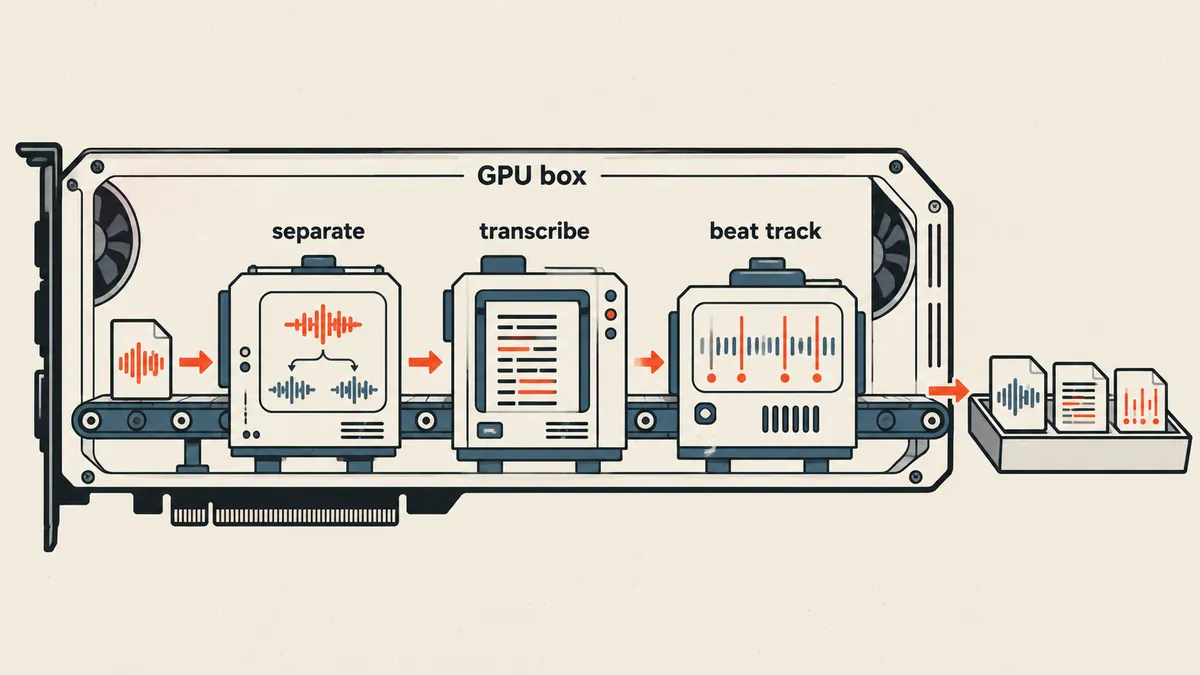
Step 0: check SHA-256 before using the GPU
The most important ordering in the script is to check first, then use the GPU. If a file becomes corrupted during transfer or I accidentally send the wrong file, running Demucs and Whisper to completion without noticing is the most expensive waste of time. I calculate the expected value on the source machine and send it along with the job.
# job_single.py — งานเดี่ยว 1 โฟลเดอร์ 1 ไฟล์ (เวอร์ชันย่อ)
import hashlib, json, subprocess, sys, time
from pathlib import Path

def sha256(path, chunk=1 << 20):
    h = hashlib.sha256()
    with open(path, 'rb') as f:
        while block := f.read(chunk):
            h.update(block)
    return h.hexdigest()

def log(msg):
    print(time.strftime('%H:%M:%S'), msg, flush=True)

job = Path(sys.argv[1])               # โฟลเดอร์งานเดียว
expected = sys.argv[2].lower()        # SHA-256 ที่คาดไว้ ส่งมาจากเครื่องต้นทาง
src = job / 'source.mp3'

actual = sha256(src)
if actual != expected:
    sys.exit(f'[ERR] SHA-256 ของต้นทางไม่ตรง ไม่แตะ GPU: {actual} != {expected}')
log('[OK] source sha256 ตรง')
Step 1: separate vocals with Demucs
I use --two-stems vocals because I only need the vocals and everything else, rather than four separate stems, and the htdemucs model works well enough for finding timings. This step is skipped if vocals.wav already exists.
sep_dir = job / 'sep'
vocals = sep_dir / 'htdemucs' / src.stem / 'vocals.wav'

if vocals.exists():
    log(f'Using existing {vocals.name}')
else:
    log('Demucs start')
    subprocess.run(
        [sys.executable, '-m', 'demucs', '--two-stems', 'vocals',
         '-n', 'htdemucs', '-o', str(sep_dir), str(src)],
        check=True)
    assert vocals.exists(), 'Demucs ไม่สร้าง vocals.wav'
Step 2: downsample to 16 kHz and transcribe with Whisper large-v3
Whisper takes mono 16 kHz audio, so I first need to convert from stereo at 44.1 or 48 kHz, then load the model on CUDA. I set word_timestamps=True to get word-level timings and condition_on_previous_text=False to reduce repeated text, a problem Whisper tends to have with repetitive audio. The del model and empty_cache calls at the end release VRAM before the next step.
words_json = job / 'words.json'

if words_json.exists():
    log(f'Using existing {words_json.name}')
else:
    import numpy as np, soundfile as sf, librosa, torch, whisper
    log('Whisper start')
    y, sr = sf.read(vocals, dtype='float32')
    if y.ndim > 1:
        y = y.mean(axis=1)                              # เฉลี่ยเป็น mono
    y = librosa.resample(y, orig_sr=sr, target_sr=16000).astype('float32')

    model = whisper.load_model('large-v3', device='cuda')
    res = model.transcribe(y, language='th', word_timestamps=True,
                           condition_on_previous_text=False, fp16=True)
    words = [{'start': w['start'], 'end': w['end'], 'word': w['word']}
             for seg in res['segments'] for w in seg.get('words', [])]
    words_json.write_text(json.dumps(words, ensure_ascii=False), encoding='utf-8')

    del model
    torch.cuda.empty_cache()                            # คืน VRAM
I do not show the contents of words.json or use them as the actual text. I treat ASR text only as timing evidence, not an accurate transcript. I covered the output errors I actually encountered separately in Whisper Transcribes Humming as Words and Gets the Timing Wrong.
In my reports, I always write human_listening_verified = false and note that ASR provides timing evidence, not the actual text. The correct description is "automatically processed," not "AI has listened," because no human has listened to verify it yet. This flag changes only when someone actually listens.
Step 3: beats with librosa and vocal levels
The final step uses librosa.beat.beat_track to estimate beats, then divides the vocal stem's RMS into 700 bins to see where vocals are present. Both results are estimates. I always include a note in the files.
beats_json = job / 'beats.json'
act_json = job / 'vocal-activity.json'

if beats_json.exists() and act_json.exists():
    log('Using existing beats / vocal-activity')
else:
    import numpy as np, librosa
    y, sr = librosa.load(src, sr=22050)
    tempo, beat_frames = librosa.beat.beat_track(y=y, sr=sr)
    beats_json.write_text(json.dumps({
        'estimated_bpm': float(np.atleast_1d(tempo)[0]),
        'beat_times': librosa.frames_to_time(beat_frames, sr=sr).round(3).tolist(),
        'note': 'ค่าประมาณ ไม่ใช่ downbeat ที่ตรวจด้วยหู',
    }, ensure_ascii=False), encoding='utf-8')

    v, vsr = librosa.load(vocals, sr=22050)
    rms = librosa.feature.rms(y=v)[0]
    bins = np.array([c.mean() for c in np.array_split(rms, 700)])
    bins = bins / (bins.max() + 1e-9)                   # ปรับเป็น 0-1
    act_json.write_text(json.dumps({
        'bins': bins.round(4).tolist(),
        'note': 'มีเสียงเครื่องดนตรีรั่วปนในสเต็มเสียงร้อง',
    }, ensure_ascii=False), encoding='utf-8')
The tempo estimated by librosa was around 129.2 BPM, while the number included in the source filename was 126, which I had not checked by ear either. The two values disagree. I keep them as a reminder that a tempo estimator does not provide ground truth. It can serve as a guide, but must not be used to decide edit points without listening.
Finish with a report and an output manifest with hashes
At the end of the job, the script writes report.json containing the input's SHA-256, the methods used, the GPU name (a 16 GB card that nvidia-smi reports as 16311 MiB), elapsed times, and the human_listening_verified flag, and copies the code used into the output folder. It then writes verification.json, listing the size and SHA-256 of every output file.
out_files = ['words.json', 'beats.json', 'vocal-activity.json',
             'vocals-preview.mp3', 'report.json', 'run.log', 'used-source-code.py']

subprocess.run(['ffmpeg', '-y', '-v', 'error', '-i', str(vocals),
                '-b:a', '160k', str(job / 'vocals-preview.mp3')], check=True)

(job / 'used-source-code.py').write_text(Path(__file__).read_text(encoding='utf-8'),
                                         encoding='utf-8')
(job / 'report.json').write_text(json.dumps({
    'input_sha256': actual,
    'method': 'demucs htdemucs two-stems -> whisper large-v3 -> librosa beat_track',
    'human_listening_verified': False,
    'note': 'ASR เป็นหลักฐานเวลา ไม่ใช่ข้อความจริง',
}, ensure_ascii=False, indent=2), encoding='utf-8')

log('[OK] job done')            # พิมพ์ข้อความสุดท้ายก่อน run.log จะถูกคิดค่า hash

# ขั้นสุดท้ายจริง ๆ: หลังจากนี้ห้ามมีอะไรเขียนลงไฟล์ผลลัพธ์อีก
verify = {f: {'bytes': (job / f).stat().st_size, 'sha256': sha256(job / f)}
          for f in out_files}
(job / 'verification.json').write_text(json.dumps(verify, indent=2), encoding='utf-8')
The important ordering here is that verification.json must truly be written last, after nothing else will write to the output files. Otherwise, the hash of run.log will not match the file copied back (this code was rewritten for readability; it is not the actual script). Next comes the transfer back.
Measurements from the log
The actual times in that run's log show Demucs starting at 06:46:57 and Whisper starting at 06:47:11, a gap of 14 seconds including model loading. The beat step then started at 06:51:31, meaning Whisper took about 4 minutes 20 seconds including model loading. The librosa step's time was not logged separately, so I will not guess.
A rerun at 06:53:16 printed Using existing for both of the first two steps and finished within 3.91 seconds. This is evidence that resume actually works, rather than just being written into the code.
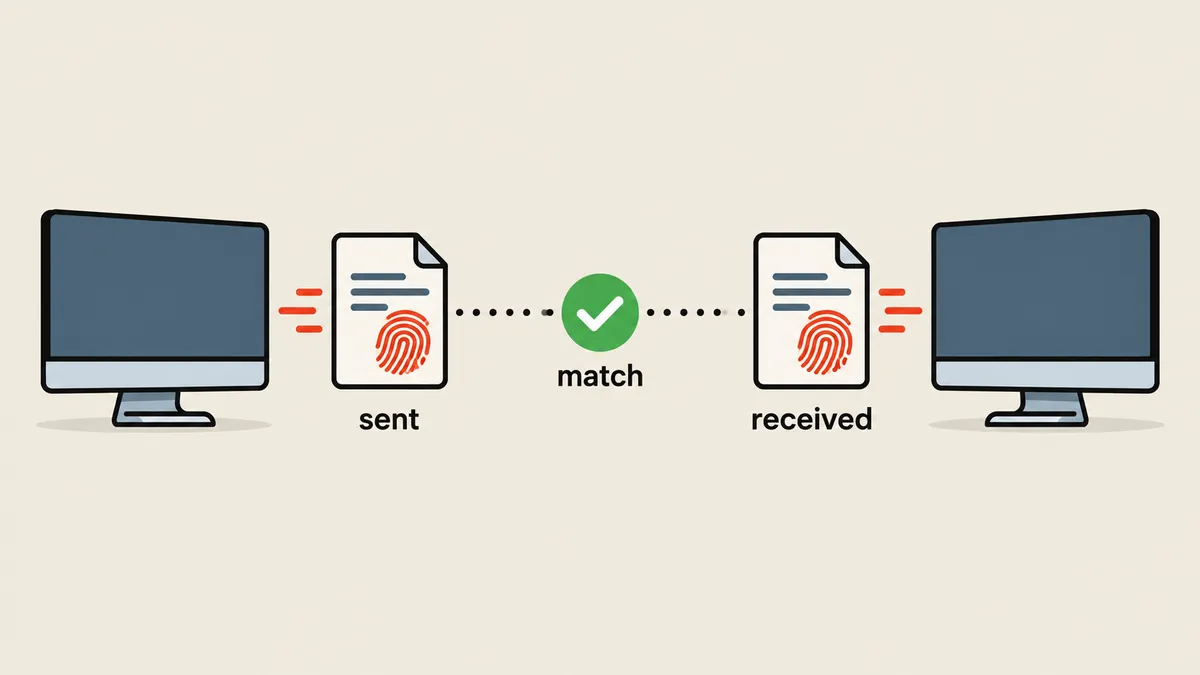
Copy back only 7 files, then compare sizes and SHA-256
My rule is to copy back only verifiable results, leaving out the original, models, and caches, which are large and serve no purpose on my main machine. The important part is never rerun a completed step just to retrieve files. The seven files copied back are words.json, beats.json, vocal-activity.json, vocals-preview.mp3, report.json, run.log, and used-source-code.py.
# บนเครื่องหลัก: ดึงกลับเฉพาะผลลัพธ์ที่ตรวจได้ (host-gpu คือ alias ของเครื่อง GPU)
mkdir -p results/job-a
for f in words.json beats.json vocal-activity.json vocals-preview.mp3 \
         report.json run.log used-source-code.py; do
  scp "host-gpu:C:/jobs/job-a/$f" "results/job-a/$f"
done
# รายการ hash ฝั่ง GPU ใช้เป็นเกณฑ์เทียบ ไม่นับเป็นหนึ่งในเจ็ดไฟล์ผลลัพธ์
scp "host-gpu:C:/jobs/job-a/verification.json" results/verification.remote.json
python verify_transfer.py results/job-a results/verification.remote.json
# verify_transfer.py — เทียบขนาดและ SHA-256 ของไฟล์ที่ดึงกลับกับที่เครื่อง GPU รายงาน
import hashlib, json, sys
from pathlib import Path

def sha256(p):
    h = hashlib.sha256()
    with open(p, 'rb') as f:
        for b in iter(lambda: f.read(1 << 20), b''):
            h.update(b)
    return h.hexdigest()

local = Path(sys.argv[1])                       # results/job-a
remote = json.loads(Path(sys.argv[2]).read_text(encoding='utf-8'))   # hash ฝั่ง GPU

ok = True
for name, want in remote.items():
    p = local / name
    got = {'bytes': p.stat().st_size, 'sha256': sha256(p)} if p.exists() else None
    same = got == want
    ok &= same
    print(f'[{"OK" if same else "ERR"}] {name}')

(local / 'transfer-verification.json').write_text(
    json.dumps({'all_verified': ok}, indent=2), encoding='utf-8')
print('all_verified =', ok)
sys.exit(0 if ok else 1)
That run returned all_verified = true for all 7 files. The original file on the GPU machine was left untouched. The models and caches also remained in place.
Why make every step skippable
The main reason for "skip if results exist" is not just saving time, but making the script a job that can be rerun without changing its results. If the network drops halfway through, I accidentally rerun it, or I only need to repeat the final step, I can run the same command without remembering which steps have finished. Each step's output file serves as its state record, so there is no need for a separate state file. On the actual rerun, the log printed Using existing for both of the first two steps, and the job finished in 3.91 seconds. I consider that the clearest test of whether resume actually works.
The tradeoff to understand is that if a step's output file is corrupted but still exists under its name, the script will skip that step and pass the corrupted file to the next one. My recommended way to reduce this risk is to write the output file as the final action of each step (the abbreviated code above does not yet write to a temporary file and then rename it). If I suspect a step has failed, the safe approach is to delete that step's output file and rerun, rather than edit the file by hand.
Another concern is GPU memory. I always call del model and torch.cuda.empty_cache() after the Whisper step because a large model holds VRAM until the process ends. If I add another GPU step later, it will not have to compete for memory with a model that has already finished its work. In this job, librosa runs on the CPU, so there was no visible difference, but I still release the memory as a habit.
Finally, I need to be clear about what this script does not do. It does not check whether the transcribed words are correct, does not check whether the estimated beats match what I hear, and does not measure the librosa step's time separately. It guarantees only two things: that the incoming source file is the correct file, and that the outgoing result files reach the main machine with every byte intact.
The sequence I use for every single job
- Create 1 new job folder, place one source file in it, calculate SHA-256 on the source machine, and send it along with the job.
- On the GPU machine, the script checks SHA-256 first. If it does not match, stop immediately without touching the GPU.
- Run Demucs, Whisper, and librosa in sequence, skipping each step if its output file already exists.
- Always release VRAM after the Whisper step, before proceeding to a step that needs memory.
- Write report.json with human_listening_verified set to false, and verification.json with hashes for every output file.
- Copy back only the seven files and run verify_transfer.py. The job is complete only when it returns all_verified = true.
Run the whole library every time
- Reprocess old work
- No file check before GPU use
- Results from multiple files can get mixed
1 folder 1 file
- Check SHA-256 first every time
- Skip steps with existing results
- Return 7 files with hash verification
The times in seconds and minutes in this article come from one song on one machine. Do not use them as a benchmark. I rewrote the abbreviated script above for readability; it is not the actual file that ran, and you should always check model names and parameters against your installed library versions first.
The lesson I keep is that when I need to run heavy work on another machine, I should make it rerunnable without wasting completed work and ensure that everything sent back comes with evidence. The feeling that "the transfer was probably fine" is not evidence. If I have left anything unexplained or made a typo, I will come back and fix it later.
Want us to set this up?
Get help with server setup, configuration, migration, or troubleshooting. Save time for the work that matters.
Hit something like this? Stuck somewhere?
Come trade notes on the LinuxThai board



Comments 0
No comments yet — be the first