Ping Works, SSH Times Out: A Dual-NIC Laptop Replies the Wrong Way

A link light and an IP do not mean an interface works. A machine with two interfaces on the same subnet can receive SYN on one and reply through the other, allowing ping to work while SSH fails completely.
1-minute summary
- Symptom / problem
- A Debian host answers ping but SSH times out, because the SYN arrives one way and the reply leaves another
- Who should read
- Admins with a machine that has two NICs on one network, LAN and Wi-Fi
- Fix in short
- Check with ip route get which NIC replies, drop routes on a dead link, and test TCP 22 from outside every time automation changes a route
I was trying to SSH into a Debian machine serving a customer's internal LAN, and the connection silently hung until it timed out, even though I could ping the machine normally. The first thought is that sshd has died or a firewall is blocking port 22, but a successful ping says the machine is still on the network, and checking the machine itself showed nothing wrong with sshd. Looking from one side revealed no problem at all. I had to measure from both sides, from the PC and from a machine connected over Wi-Fi, before the picture started to emerge. This article describes what happened to a machine with two network interfaces and how I isolated the cause. Every address in this article is an example in the 192.0.2.x range that I substituted for the original.
I personally observed ping still working while SSH failed, but I did not establish from logs why ICMP survived in this situation, so I will not explain that part beyond what I saw. The mechanism where SYN arrives on one interface and the reply leaves through another can be seen directly in the machine's routing table.
How this machine was configured
This machine is a laptop I use as a server. It runs Debian with ifupdown rather than NetworkManager (the latter is inactive). Wired LAN is the primary connection and gets a fixed IP through a DHCP reservation on the router, while Wi-Fi is the backup and accepts whatever address DHCP assigns. The machine runs self-heal every minute, checking carrier, IPv4, gateway ping per interface, internet access, DNS, and HTTPS to the API of the chat service this machine needs to communicate with, then uses ip route get to see which interface the default route actually uses.
The two interfaces have addresses on the same /24 subnet. Suppose the wired address is 192.0.2.10 and Wi-Fi is 192.0.2.11, with 192.0.2.1 as the gateway. There is nothing inherently wrong with this, but it gives Linux two roughly equivalent choices for talking to the same subnet, and when something goes wrong, the symptoms are stranger than with a single interface.
The incident: the wired link was up and had an IP, but could not reach the gateway
On the day this happened, the machine's wired link light was on, and the interface still had its IP configuration. Everything on screen looked normal, but that cable connection could not actually reach the gateway (I found this out later when I replaced the cable). Self-heal, which checks gateway reachability per interface, saw that the wired connection was unusable and did what it was designed to do: move the default route to Wi-Fi so the machine could keep reaching the internet. But there was one thing it did not do: remove the wired IP from the interface.
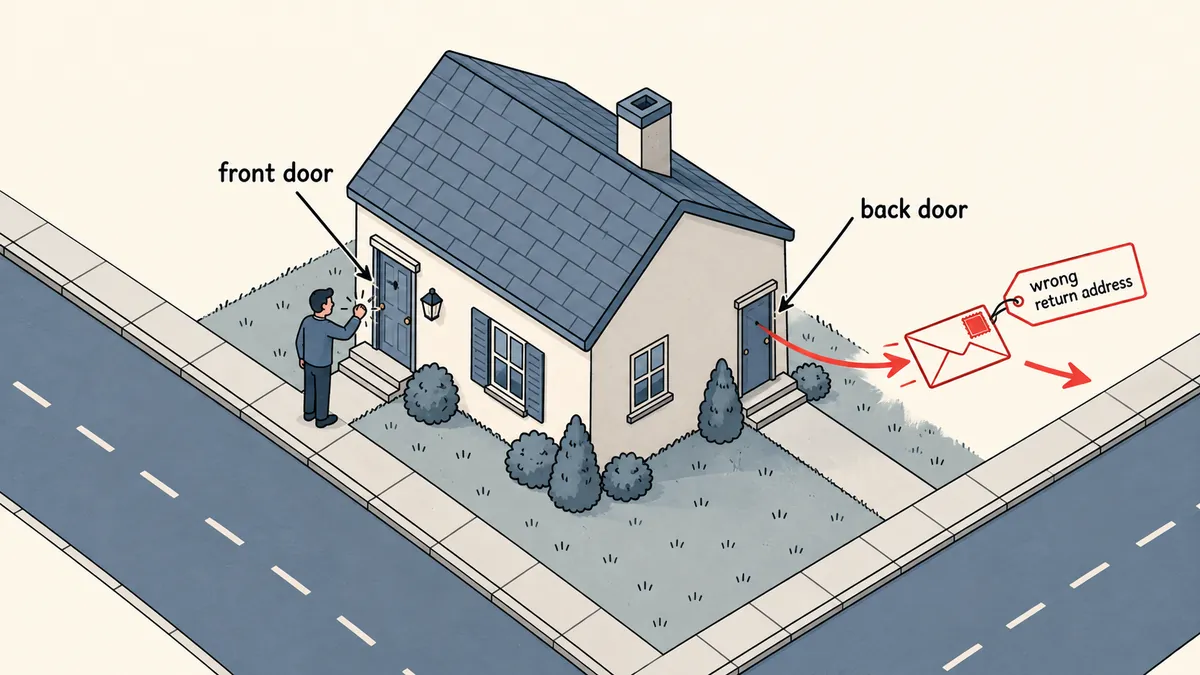
The result was that the machine still owned 192.0.2.10 on the wired interface, while the default route pointed through Wi-Fi. A client connecting over SSH to .10 could get its SYN to the wired interface (I did not investigate why incoming traffic on the wired connection still worked when outgoing traffic could not reach the gateway, so I will stick to what I observed). But when the machine went to reply with SYN-ACK, it consulted the routing table and found that outgoing traffic had to use Wi-Fi, as directed by the default route, using .10 as the source address even though that address belonged to the other interface. This reply left through a different path from the one the request arrived on. The client never received a SYN-ACK matching its session, so TCP 22 timed out.
This is called asymmetric routing: the forward and return paths are different. A network with a single interface does not encounter this because there is always only one outgoing path, while a machine with two interfaces on the same subnet can encounter it as soon as the default route does not match the interface that received the packet.
The diagnostic ladder that worked
Because these symptoms are invisible from just one side, I used a four-step ladder, working from the cheapest check to the most expensive. First, ping the gateway per interface, specifying the interface explicitly, to see whether each one can actually reach the gateway. Second, check which interface the machine will actually choose to reach the client. Third, compare results from the wired PC and the machine connected over Wi-Fi. Finally, replace the cable and measure again.
# 1) ถึง gateway ไหมต่อการ์ด (ping -I บังคับการ์ด)
ping -c 3 -I lan0  192.0.2.1
ping -c 3 -I wlan0 192.0.2.1

# 2) เส้นออกจริงตอนตอบไคลเอนต์คือการ์ดไหน และใช้ source อะไร
ip route get 192.0.2.50
ip route show default
ip -br addr

# 3) เทียบจากสองฝั่งที่ต่างกัน (รันบนไคลเอนต์ทีละเครื่อง)
ssh -o ConnectTimeout=5 [email protected] true; echo "exit=$?"
ssh -o ConnectTimeout=5 [email protected] true; echo "exit=$?"
In ip route get, look at two words: dev and src. If dev is wlan0 but the incoming connection is to .10, the incoming and outgoing paths differ. For step 3, compare the two addresses. If SSH to .11 (the Wi-Fi address) works while .10 fails, that tells me the machine and sshd are fine, and the problem lies in the wired path. In the meantime, I made two ssh aliases, the regular one and one with -lan, pointing to whichever address was reachable at the time so I could keep working before replacing the cable.
A related issue: two interfaces on the same subnet and ARP
I have notes from another incident involving the same kind of machine. In that case, both wired LAN and Wi-Fi were on the same /24 subnet (say .10 and .11), and the kernel's default arp_ignore setting allowed both interfaces to answer ARP on each other's behalf. The router's table therefore showed both MAC addresses using the same IP, and replies to clients connected over Wi-Fi disappeared, while wired machines could still connect normally. I fixed it on the machine by setting arp_ignore so each interface would answer only for its own IP. I did not reopen the settings to verify the actual value before writing this article, so I will not give a number. Anyone applying this should consult the kernel documentation for arp_ignore and arp_announce and always read their machine's current values before changing them.
# อ่านค่าปัจจุบันก่อนแก้อะไร
sysctl net.ipv4.conf.all.arp_ignore net.ipv4.conf.all.arp_announce
sysctl net.ipv4.conf.lan0.arp_ignore net.ipv4.conf.wlan0.arp_ignore
The ARP problem and the problem of replies taking the wrong route are separate issues, but they share the same root: one machine has multiple addresses on the same subnet. Both produce strange symptoms, and a successful ping does not prove that everything works over that path.
Measures the machine takes on its own
After this incident, I changed two things. The first was a sysctl setting telling the kernel not to use routes whose links are down, so a default route tied to a wired interface with a down link would not linger in the table.
# /etc/sysctl.d/90-net.conf
net.ipv4.conf.all.ignore_routes_with_linkdown = 1
net.ipv4.conf.default.ignore_routes_with_linkdown = 1
net.ipv6.conf.all.ignore_routes_with_linkdown = 1
net.ipv6.conf.default.ignore_routes_with_linkdown = 1
The second was for self-heal to restore wired LAN as the primary connection when the link returns (ifdown --force followed by ifup, spaced at least 120 seconds apart). But if the wired link is up yet has no internet access, it falls back to Wi-Fi and retries the wired connection in ten minutes. For the case where "the gateway replies but there is no internet access," I treat it as an ISP outage and do nothing to the machine. I have already described self-heal's full recovery ladder in detail in Distinguish Link Failure from an ISP Outage Before Restarting, so I will summarize it here in a short table.
| Consecutive symptoms | What self-heal does |
|---|---|
| DNS failure | Rewrite resolv.conf |
| Interface has no IPv4 (2 rounds) | ifdown followed by ifup |
| Wi-Fi is down (3 rounds) | ifup followed by restart wpa_supplicant |
| No interface can reach the gateway (6 rounds) | restart networking |
| No recovery within 40 minutes | Reboot, at most once per 6 hours |
It sends alerts only for outages lasting 15 minutes or longer, with a short cause summary written by a small model from the logs supplied to it, without allowing the model to use any tools.
This incident came from a logically correct fix: moving the default route to a working connection. But the side effect made the machine inaccessible from outside. Every time automation changes a route, someone or another machine must test that this machine is actually reachable from outside, rather than checking from inside that it can reach the internet.
netprobe: identifying why connectivity was lost
The second addition I made was netprobe, a script that writes one CSV row every minute recording the current network state. It measures ping to the gateway and two public resolvers (in milliseconds), name resolution, access to the chat service API, the model API host, the provider's website, indicators from the status page, and the number of lines containing 529 or overloaded or timeout in the bot's logs over the last 2 minutes. It then assigns a single cause label, removing the guesswork.
# ตัวอย่างลำดับตัดสินแบบย่อ (ของจริงมีค่าที่วัดมากกว่านี้)
def classify(m):
    if not m["gw_ok"]:                      return "lan"
    if not (m["r1_ok"] or m["r2_ok"]):      return "isp"
    if not m["dns_ok"]:                     return "dns"
    if not m["chat_api_ok"]:                return "chat"
    if m["provider_down"] or m["overloaded_lines"] > 0:
                                            return "provider"
    return "ok"

# แจ้งเมื่อป้ายเดิมซ้ำ 2 รอบติด และแจ้งตอนหายพร้อมระยะเวลา
def should_alert(history):
    return len(history) >= 2 and history[-1] == history[-2] != "ok"
If the label is lan or isp, I leave self-heal to handle it. netprobe simply writes the latest result to /run/netprobe/last.json so self-heal can include the measured cause in its alert message, and it has a --report mode summarizing the downtime in minutes per cause over the past 24 hours.
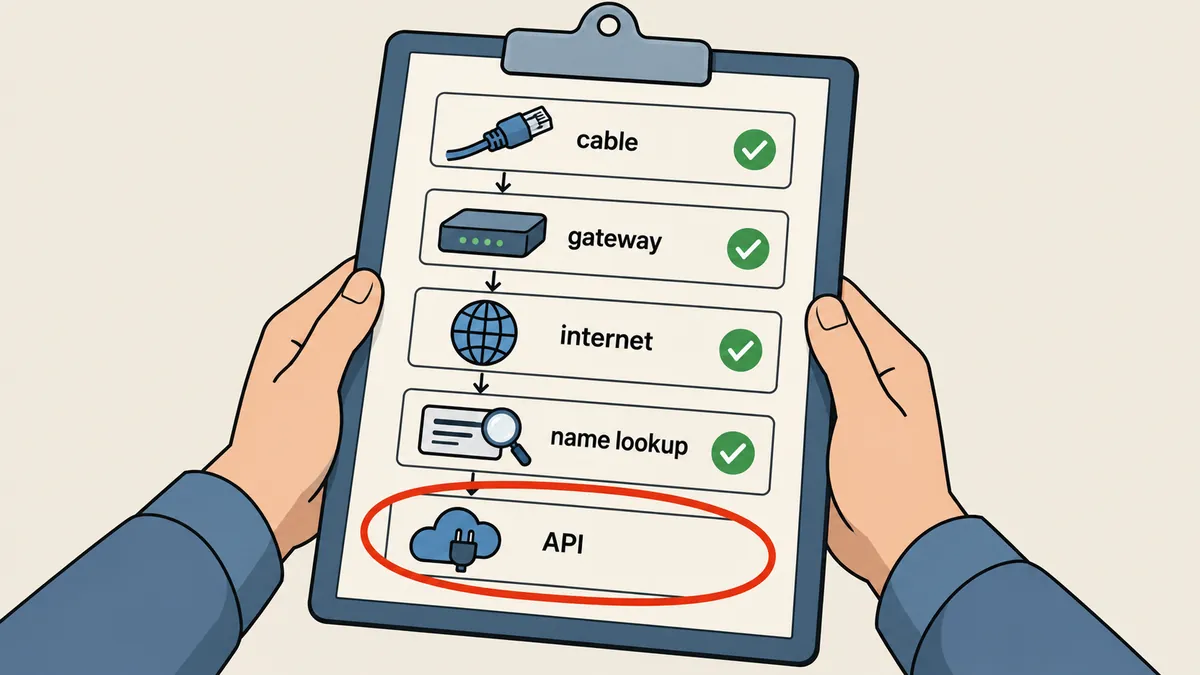
There is one observation I am recording only as an observation, not a conclusion: sometimes what looks like a lost internet connection is actually an overloaded API provider rather than our network. I suspect this is related to the growing chat history, but I cannot prove it from the files I have, so I will leave it as an observation.
A known solution I did not use on this machine
Linux has a standard way to make a machine with multiple interfaces send replies through the same interface that received the request. It is called policy routing: create a separate routing table per interface, then set rules so packets whose source is an interface's address use that interface's table. I have included an example only for reference, because on this machine I chose to fix the problem by keeping the routes correct (discarding routes whose links are down and restoring wired LAN when it returns). I did not actually try this method on this machine. Anyone using it should first test it on a machine that still has an alternative way in.
The method I used on this machine
Keep the default route pointing to the primary connection that actually works, and do not leave routes for interfaces with down links lingering in the table. The advantage is fewer rules that are easy to read. The disadvantage is relying on self-heal to work correctly all the time.
Reply through the receiving interface
Set up separate routing tables per interface and rules based on source. The advantage is tolerance of a mismatched default route. The disadvantage is additional rules that must be kept in sync with addresses that can change.
# ตัวอย่างแนวคิดเท่านั้น (192.0.2.x) ยังไม่ได้ทดสอบกับเครื่องนี้
echo "100 lan"  >> /etc/iproute2/rt_tables
ip route add 192.0.2.0/24 dev lan0 src 192.0.2.10 table lan
ip route add default via 192.0.2.1 dev lan0 table lan
ip rule add from 192.0.2.10/32 table lan
Test access from outside whenever automation touches routes
The reminder I took most seriously from this incident is that a system that can fix itself also needs checks from outside. When self-heal moved the route to Wi-Fi, the machine could reach the internet over Wi-Fi, which was true for outgoing traffic, but no check asked whether incoming access still worked. The simplest method is to have another machine on the same subnet (or the machine I use for administration) periodically try connecting to TCP 22 on this machine and record the result. If it cannot connect while ping works, that gives me another label worth far more than the cost of the check.
# รันจากเครื่องอื่นในวงเดียวกัน ทุกนาทีด้วย cron หรือ timer
timeout 5 bash -c '</dev/tcp/192.0.2.10/22' && echo "tcp22 ok" || echo "tcp22 FAIL"
ping -c 1 -W 2 192.0.2.10 >/dev/null && echo "icmp ok" || echo "icmp FAIL"
When these two lines give different results (icmp ok but tcp22 FAIL), that is the fingerprint of the symptoms in this article. There is no need to waste time investigating sshd.
Four lessons
- A link light and an IP do not mean the connection works. Test gateway reachability per interface every time.
- Do not leave an IP on a non-primary interface without adjusting routes or ARP, or you can end up with a machine that receives packets through one interface but replies through another.
- Test access from outside the machine every time self-heal changes a route.
- Measured cause labels reduce guesswork when deciding to restart something.
Personally, I will avoid putting two interfaces on the same subnet again on a machine that needs to accept incoming work, unless it is necessary. Using only wired LAN with a separate backup machine would be much simpler. But if two interfaces are required, routes and ARP need to be configured correctly from the start, according to the needs of the job. If I have explained anything too briefly or made a mistake, I will come back and amend it later.
Want us to set this up?
Get help with server setup, configuration, migration, or troubleshooting. Save time for the work that matters.
Hit something like this? Stuck somewhere?
Come trade notes on the LinuxThai board



Comments 0
No comments yet — be the first