Claude Quota Running Low: One Flag Keeps Customer Chat Going

A shared resource with no priorities always runs out when it matters most, and the first person to find out is the customer who types a question and gets no answer.
1-minute summary
- Symptom / problem
- Several workloads share one Claude account, and near the quota limit the customer chat may stop answering.
- Who should read
- Anyone running customer chat and background jobs on one Claude account.
- Fix in short
- Save the rate_limit_event sent with each turn as a single flag file. Other jobs read it and pause, so customer chat keeps answering, with no extra requests.
I have several workloads that use the same Claude subscription account. The first is a chat on a client's website that responds to visitors. The second is background website editing that I let AI handle. The third is an assistant bot I talk to through a chat app. Normally, all three can coexist, but when quota runs low, the one thing that must not happen is customer chat being unable to respond, because heavy background workloads can consume the quota customers need.
Another constraint I set myself was that I did not want to spend extra requests asking "how much quota is left," because asking consumes quota too, and having every workload ask independently would waste even more.
I am leaving the service name, subscription plan name, and account name out of this article. The rest describes the mechanism I actually use.
Free Information Included with Every Turn
I noticed that every running Claude CLI process already reports rate_limit_event in its output stream. It contains the account's quota status at that turn.
{
  "type": "rate_limit_event",
  "rate_limit_info": {
    "status": "allowed_warning",
    "rateLimitType": "five_hour",
    "utilization": 0.91,
    "resetsAt": 1798000000
  }
}
I made up the numbers in the example above to show the format; they are not values from a real account. The status field has three possible values: allowed, allowed_warning, and rejected. The rateLimitType field identifies the five_hour or seven_day window. The utilization value is a fraction from 0 to 1, and resetsAt is the reset time for that window. A turn that actually hits the limit returns a limited result.
This information costs nothing extra. It comes with the response for a turn I have already paid for. My idea was to store it in one place where every workload could see it.
Another option I considered was having each workload periodically check quota status itself. But that would require each one to make its own extra requests, asking the same question repeatedly, with answers arriving at different times. Some would see normal status while others would see quota running low. I chose to have them all send what they already observe to one central place and read the result from that same place. That gives them all the same view, without a single extra request.
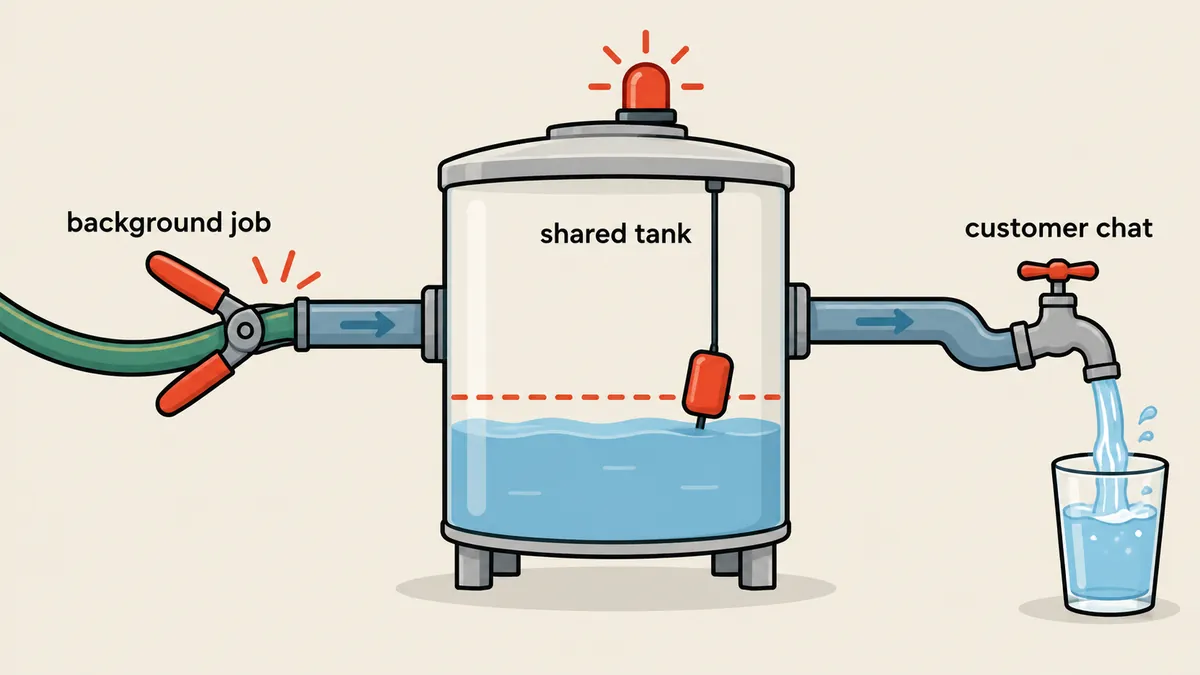
A Single Flag File
I have the session manager for every workload send data from every turn to an observe() function, which maintains a single flag file containing a small JSON object.
{
  "since": 1797990000,
  "updated": 1797990400,
  "until": 1798000000,
  "type": "five_hour",
  "util": 0.91,
  "status": "allowed_warning",
  "by": "chat",
  "why": "util 0.91 >= 0.90"
}
This file has only two states: present (low quota) or absent (normal). Other workloads only need to check whether the file exists. If it does, they also check until to see whether it has expired. I added the by and why fields to make debugging easier, so I can see who set the flag and why. I can open the file and understand it immediately, without any tools to explain it.
When to Set and Clear the Flag
There are three rules for setting the flag. I set it when a subscription-account turn shows utilization above the threshold for its window, when the status is rejected, or when the turn's result is limited.
I chose the thresholds myself, separately for each window.
The flag's expiration time (until) comes from resetsAt for that window. If the turn does not provide a reset time, I set it to now plus 15 minutes, so the flag cannot remain forever even if nobody clears it.
There are two ways to clear it. The first is for a subsequent turn in the same window to report utilization below the threshold. The second is for the time to pass until.
Another important detail that is easy to get wrong is that turns using an API key neither set nor clear the flag, because they do not use subscription quota. The numbers in their events say nothing about the subscription account. If I let them clear the flag, a correctly set flag would disappear even while subscription quota was still low. When API credits are enabled, workloads run on those credits instead, so this flag does not stop them.
# quota_flag.py — แกนของ observe() แบบย่อ
import json, os, time

FLAG = os.environ.get('QUOTA_FLAG_FILE', '/var/run/quota.flag')
LOW = {'five_hour': 0.90, 'seven_day': 0.95}
DEFAULT_LOW = 0.95
NO_RESET_HOLD = 15 * 60            # ไม่มี resetsAt ให้ถือธงไว้ 15 นาที

def observe(info, via_subscription, who):
    """info = rate_limit_info ของเทิร์นนั้น; เทิร์นที่ใช้ API key ไม่แตะธง"""
    if not via_subscription:
        return
    now = int(time.time())
    window = info.get('rateLimitType')
    util = float(info.get('utilization') or 0)
    low = LOW.get(window, DEFAULT_LOW)
    limited = info.get('status') == 'rejected' or info.get('limited')

    if util >= low or limited:
        until = info.get('resetsAt') or now + NO_RESET_HOLD
        write_flag(since=now, until=until, type=window, util=util,
                   status=info.get('status'), by=who,
                   why=f'util {util:.2f} >= {low:.2f}' if not limited else 'limited')
    else:
        clear_if_same_window(window)       # เทิร์นถัดมาของหน้าต่างเดียวกัน ต่ำกว่าเกณฑ์

def flag_active():
    try:
        f = json.load(open(FLAG))
    except (OSError, ValueError):
        return False
    return time.time() < f.get('until', 0)
When a turn in the five_hour window reports utilization below the threshold, a flag set by the five_hour window is cleared, but a flag set by seven_day is left alone, because information about one window says nothing about the other.
Who Respects the Flag, and How
I define "stop" very narrowly in this system: do not start a new turn. I do not interrupt a turn that is already running, because cutting it off wastes both the work and the quota already spent. This narrow definition also makes the behavior easy to verify, because the only place that needs to check the flag is before starting a turn; there is no need to intercept every step in the middle of a job.
Background website edits
Accept no new jobs. Jobs already in the queue simply wait, with nothing else to do. Once the flag disappears, processing resumes automatically.
Assistant bot
New turns wait. Send the user one notice, run when the flag clears, and give up after waiting 2 hours with a message asking them to try again later.
Customer chat never stops. Its only responsibilities regarding the flag are to set and clear it. The reason is simple: if customer chat stopped itself because of the flag, the flag would serve no purpose. It exists to keep that chat from stopping.
# ฝั่งงานเบื้องหลัง: ตรวจธงก่อนเริ่มเทิร์นใหม่เท่านั้น
import time
from quota_flag import flag_active

QUOTA_HOLD_HOURS = 2

def run_turn(job):
    waited = 0
    while flag_active():
        if waited == 0:
            notify_once(job, 'โควตาต่ำ รอก่อน')   # ส่งโน้ตครั้งเดียว
        if waited >= QUOTA_HOLD_HOURS * 3600:
            return give_up(job, 'ขอให้ถามใหม่ทีหลัง')
        time.sleep(60)
        waited += 60
    return do_turn(job)                           # เทิร์นที่เริ่มแล้ว ไม่ถูกตัดกลางทาง
The single flag file works only because every workload agrees to read it and send data to observe(). There is no enforcement at the operating system level. If I forget to connect a new workload to the flag, it cannot see the others, and none of them can see it. Before adding a new workload, I therefore check that it calls observe and checks the flag.
Switches for the Operator
A system like this needs a manual way to turn it off, because sometimes I know what is happening and want the jobs to keep running. I provided two layers. The first is the environment variable QUOTA_PRIORITY=0 in .env, which means nothing is stopped. The second is a command for inspecting and managing the flag.
$ python quota_flag.py status            # ดูธงปัจจุบัน
$ python quota_flag.py clear             # ลบธง
$ python quota_flag.py off --hours 6     # ให้ workload เพิกเฉยธง 6 ชม. แล้วกลับมาเคารพเอง
$ python quota_flag.py on                # เลิก override
$ python quota_flag.py set --hours 1     # ตั้งธงเองด้วยมือ 1 ชม. เช่น ก่อนงานสำคัญ
off does not delete the flag. It writes an override file that makes workloads skip the check until the override expires. on deletes the override file. I gave it an expiration time because I was worried I would forget and leave the switch off overnight.
Benefits, Limitations, and Testing
The benefits I see are that no extra "check quota" requests are needed, the information comes free with every turn, priorities clearly define who can stop and who cannot, and the flag is a single file I can understand just by opening it.
I need to cover the limitations in full. First, the flag reacts after a turn has already happened, rather than in advance, because utilization comes from the latest turn for that window. If one turn consumes enough to go far beyond the threshold, the flag is set afterward. Second, every workload must agree to send data to observe(), or they cannot see each other. Third, the flag relies on cooperation, as described above.
The thresholds of 0.90 and 0.95 are defaults in my code, not requirements from the provider, and I did not write this article to teach anyone how to evade a provider's limits. It is about allocating quota I have paid for among my own workloads.
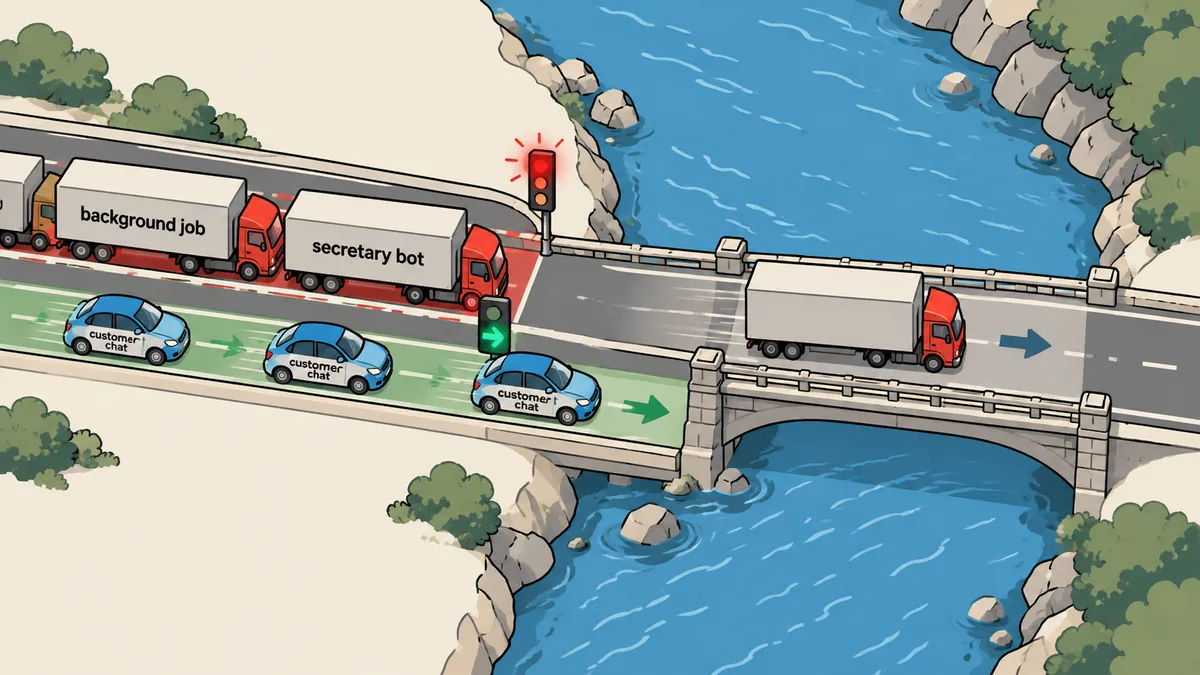
For testing, I already have test suites for each workload covering the various flag states, and I also simulated a turn with utilization of 0.91 in the 5-hour window to check that background jobs stopped while chat continued as intended.
- Simulate a subscription turn with
five_hourutilization of 0.91, then callobserve(). - Check that the flag file is written and
quota_flag.py statusshows awhyvalue matching the threshold. - Submit a job to the background workload. It must not start a new turn, and chat must still respond.
- Simulate a subsequent turn at 0.80. The flag must disappear, and background processing must resume.
- Simulate a turn using an API key at 0.99. It must neither set nor clear the flag.
A related case is another provider whose limits can only be detected through error messages, requiring the workload to sleep until the reset time. I wrote about that separately in agy-gemini-cli-batch-quota-sleep-until-reset. Translation work that uses another kind of quota monitor is covered in llm-translate-site-stale-hash-code-checks-failed-cache. I chose a single flag file because it is simple enough to debug by inspection. Anyone who prefers a database or a central queue can use that instead. If I have left anything out or made any typos, I will come back and fix them later.
Hit something like this? Stuck somewhere?
Come trade notes on the LinuxThai board



Comments 0
No comments yet — be the first