Child Processes: Unread stderr Hangs, Dead Readers Cause Crashes
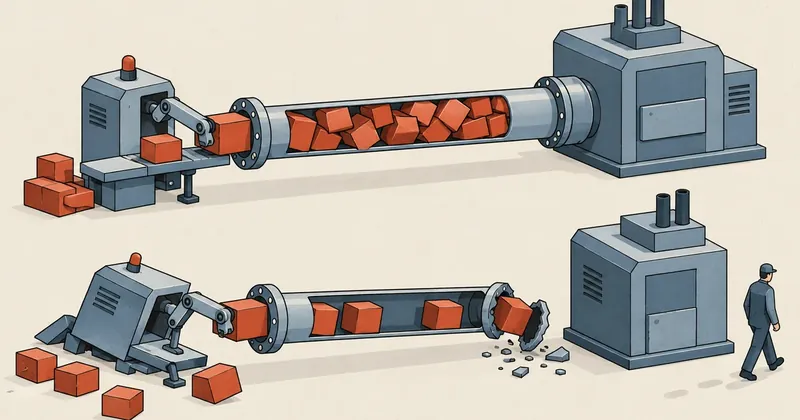
A stdio pipe has two ends, and either end can cause a failure. A reader that refuses to read makes the writer hang. A reader that has died makes the writer fail. Neither case produces even a single error pointing to the pipe.
1-minute summary
- Symptom / problem
- A child process hangs after debug lines are added to stderr, or crashes when the reading end of its pipe is already dead.
- Who should read
- Developers who spawn child processes and talk to them over stdio pipes.
- Fix in short
- Keep stderr output short and write the full text to a file, and pass a file handle to the child instead of a pipe when it must outlive the reader.
I had just added debug logging to a small server when the smoke test script that used to pass 9/9 simply froze. No error, no timeout from the server, nothing on stdout. The terminal stayed like that until I had to kill it myself. The cause was not in the code I had added, but in a pipe nobody was reading. In the same project, I also had to make a decision about the exact opposite situation: a child process whose pipe had a reader, but that reader would close first.
The system in question is a real-time data monitoring UI I wrote in C#, which I will call the control UI. It starts a child process I call the engine, and there is another stdio server in between that lets an AI assistant call into it. I have changed all the filenames, process names, and paths in this article. The numbers and sequence of events are real.
The symptom: a smoke test that used to pass 9/9 freezes
The stdio server talks to its caller in the simplest way possible: it receives JSON one line at a time over stdin and replies with JSON one line at a time over stdout, leaving stderr for human-readable messages. My test script was a short Python script that started the server, sent 9 types of requests, and checked the responses.
# smoke.py รุ่นที่ค้าง
import json, subprocess

proc = subprocess.Popen(
    ["tool-server.exe", "--stdio"],
    stdin=subprocess.PIPE,
    stdout=subprocess.PIPE,
    stderr=subprocess.PIPE,      # เปิดท่อไว้ แต่ทั้งสคริปต์ไม่มีบรรทัดไหนอ่านมัน
    text=True, encoding="utf-8",
)

def call(req: dict) -> dict:
    proc.stdin.write(json.dumps(req) + "\n")
    proc.stdin.flush()
    return json.loads(proc.stdout.readline())   # ค้างอยู่ตรงนี้
What I added was debug logging that echoed every request and response to stderr so I could see what the AI assistant was sending. A single line could be up to 4 KB long because it contained the entire JSON payload. After that, the same script hung. readline() never returned, and the server stayed silent, with not a single error or timeout message to read.
Two wrong guesses before I looked at the pipes
My first guess was a deadlock in the server's own locking, because both sides sitting still without an error looked very much like a deadlock. So I traced the lock acquisition order, but that was not it.
My second guess was that a new request type added in the same round of changes was waiting for a response from the engine. This sounded more plausible because it really was new, but it was wrong too.
What led me astray was that both guesses were about "the code I had just changed," while the real cause was "the number of bytes I had just added." There was not a single faulty line in the server code.
Both sides are idle, there is no exception or timeout, and the symptoms started after increasing message volume, rather than changing the logic. If this fits, first count how many pipes the child process has and check whether someone is actually reading each one before tracing locks.
The real cause: stderr fills at around 4 KB, then write blocks
stderr=subprocess.PIPE creates an anonymous pipe. The write end goes to the child process, and the read end stays with the script. The pipe has a finite buffer. On Windows, if the pipe creator does not specify a size, the buffer in my case was around 4 KB (on Linux, the default is much larger at 64 KB, so the same symptom appears later, but it still appears). As long as there is room in the buffer, writes complete immediately regardless of whether anyone is reading. Once it fills, however, the next write will wait until the read end drains some data.
With 4 KB log lines and a 4 KB pipe, the buffer fills within the first few lines. The server's next write to stderr then blocks forever because the test script will never read that pipe. Stuck writing a log message, the server cannot reach its next task, even though stdout, the actual work channel, is still empty. Meanwhile, the script waits in readline() for stdout output that will never arrive. Both sides are waiting on each other through different pipes.
The fix in the test script was very simple: just change stderr's destination from a pipe to a file. A file has no 4 KB buffer to fill, and as a bonus, I can read it later to see what the server complained about.
# smoke.py รุ่นที่แก้: stderr ลงไฟล์ ไม่มีบัฟเฟอร์ให้เต็ม และเปิดอ่านย้อนหลังได้
errlog = open("smoke.stderr.log", "w", encoding="utf-8")
proc = subprocess.Popen(
    ["tool-server.exe", "--stdio"],
    stdin=subprocess.PIPE,
    stdout=subprocess.PIPE,
    stderr=errlog,               # หรือ subprocess.DEVNULL ถ้าไม่อยากเก็บ
    text=True, encoding="utf-8",
)
The same trap exists in .NET. Anyone using Process.Start with RedirectStandardError = true needs something to drain that pipe throughout the child's lifetime. Otherwise, the child hangs when the pipe fills in exactly the same way. The .NET documentation recommends reading at least one stream asynchronously.
var psi = new ProcessStartInfo("tool-server.exe", "--stdio")
{
    UseShellExecute = false,
    RedirectStandardInput = true,
    RedirectStandardOutput = true,
    RedirectStandardError = true,
};
using var errLog = TextWriter.Synchronized(new StreamWriter("server.stderr.log", append: true));
using var p = Process.Start(psi)!;
p.ErrorDataReceived += (_, e) => { if (e.Data != null) errLog.WriteLine(e.Data); };
p.BeginErrorReadLine();          // ดูด stderr ทิ้งไว้เบื้องหลัง แล้วค่อยคุยงานทาง stdin/stdout
Fixing the server: short 240-byte stderr lines, full messages in a file
Fixing the test script could have been the end of it, but the test script is not this server's only host. The actual host is someone else's AI tool, and I do not know whether it reads stderr, how often it reads, or whether it simply leaves the pipe open like my script did. A stdio program that does not know its host must assume that nobody may be reading stderr at all. So I also changed the server: full messages go to a log file, while the copies sent to stderr are trimmed to 240 bytes per line.
static readonly object Gate = new();
static StreamWriter? _file;      // เปิดครั้งเดียวตอนสตาร์ต AutoFlush = true

static void DebugLine(string line)
{
    lock (Gate)
    {
        try { _file?.WriteLine(line); }            // ข้อความเต็ม ลงไฟล์ ไม่มีวันบล็อกเพราะท่อ
        catch (IOException) { }                    // เขียน log ไม่ได้ ต้องไม่ทำให้งานหลักล้ม
        Console.Error.WriteLine(ClipUtf8(line, 240));
    }
}

// ตัดตามจำนวนไบต์ UTF-8 โดยไม่ผ่ากลางอักขระ
static string ClipUtf8(string s, int maxBytes)
{
    if (Encoding.UTF8.GetByteCount(s) <= maxBytes) return s;
    int bytes = 0, i = 0;
    while (i < s.Length)
    {
        int len = char.IsHighSurrogate(s[i]) && i + 1 < s.Length ? 2 : 1;
        int b = Encoding.UTF8.GetByteCount(s.AsSpan(i, len));
        if (bytes + b > maxBytes - 3) break;
        bytes += b;
        i += len;
    }
    return s.Substring(0, i) + "...";
}
After fixing both sides, the expanded smoke test suite passed 11/11.
I need to be precise here. A 4 KB pipe divided by 240 bytes per line gives around 17 lines. If the host really never reads stderr, line 18 will still hang. Shortening the lines helps with hosts that read slowly or intermittently. It does not help with hosts that never read. What actually addresses the problem is putting the full messages in a file. So I treat stderr in a stdio program as suitable for a limited number of messages, such as startup lines and serious errors, while logs that grow with the number of requests must always go to a file.
The other side of the pipe: a reader that has died
The second case was not a bug, but a design decision where the wrong choice would produce the reverse of the first bug.
The control UI starts the engine as a child process with no window, and the requirement is that the engine must keep running even if the UI closes or crashes. The natural impulse is to use Process.Start with RedirectStandardOutput, then read the lines and display them in the UI. That works well as long as the parent is still alive. But when the UI closes, the pipe's read end disappears along with the parent process. After that, every time the engine prints anything to the console, the write fails with a broken pipe error. Different languages and runtimes handle this differently: some silently swallow it, some throw an exception, and some panic immediately, such as Rust's println!, which panics when writing to stdout fails. The result is that a process intended to survive the UI closing instead dies because of an ordinary log line.
A pipe nobody reads
- The read end is still open, but nobody drains it
- The buffer fills, and the writer hangs
- No error on either side
- Appears when log volume increases
A pipe whose reader has died
- The read end closes with the parent process
- The writer fails as soon as it writes
- The error is in the child, where nobody can see it anymore
- Appears when the UI closes while the child is still running
Both cases share a solution: stop putting pipes between processes with different lifetimes. If the child must outlive the parent, stdout's destination must be something that does not die with the parent: a file.
Pass an inheritable file handle to the child, not a pipe
.NET's Process.Start offers only "no redirection" or "redirect through a pipe back to the parent." There is no way to say that the child's stdout should be this particular handle. So I call CreateProcessW myself: open the log file, enable inheritance only on the intended handles, put them in STARTUPINFO, start the child, and immediately clear the inheritance flags.
const uint HANDLE_FLAG_INHERIT = 0x1;
const int STARTF_USESTDHANDLES = 0x100;
const uint CREATE_NEW_PROCESS_GROUP = 0x200, CREATE_BREAKAWAY_FROM_JOB = 0x01000000, CREATE_NO_WINDOW = 0x08000000;
const uint GENERIC_READ = 0x80000000, FILE_APPEND_DATA = 0x4;
const uint SHARE_ALL = 0x1 | 0x2 | 0x4, OPEN_EXISTING = 3, OPEN_ALWAYS = 4;
static readonly object SpawnGate = new();

static int StartEngine(string exe, string args, string logPath)
{
    using SafeFileHandle hOut = CreateFileW(logPath, FILE_APPEND_DATA, SHARE_ALL, IntPtr.Zero, OPEN_ALWAYS, 0, IntPtr.Zero);
    using SafeFileHandle hNul = CreateFileW("NUL", GENERIC_READ, SHARE_ALL, IntPtr.Zero, OPEN_EXISTING, 0, IntPtr.Zero);
    if (hOut.IsInvalid || hNul.IsInvalid) throw new Win32Exception();

    var si = new STARTUPINFO
    {
        cb = Marshal.SizeOf<STARTUPINFO>(),
        dwFlags = STARTF_USESTDHANDLES,
        hStdInput = hNul.DangerousGetHandle(),
        hStdOutput = hOut.DangerousGetHandle(),
        hStdError = hOut.DangerousGetHandle(),
    };
    var cmd = new StringBuilder($"\"{exe}\" {args}");
    uint flags = CREATE_NO_WINDOW | CREATE_NEW_PROCESS_GROUP;

    lock (SpawnGate)                                   // ห้ามมีการ spawn อื่นแทรกระหว่างที่ธงเปิดอยู่
    {
        SetHandleInformation(hOut, HANDLE_FLAG_INHERIT, HANDLE_FLAG_INHERIT);
        SetHandleInformation(hNul, HANDLE_FLAG_INHERIT, HANDLE_FLAG_INHERIT);
        try
        {
            bool ok = CreateProcessW(null, cmd, IntPtr.Zero, IntPtr.Zero, true /* bInheritHandles */,
                                     flags | CREATE_BREAKAWAY_FROM_JOB, IntPtr.Zero, null, ref si, out PROCESS_INFORMATION pi);
            if (!ok)                                   // job ที่ไม่อนุญาต breakaway จะปฏิเสธ ลองใหม่โดยไม่มีธงนั้น
                ok = CreateProcessW(null, cmd, IntPtr.Zero, IntPtr.Zero, true, flags, IntPtr.Zero, null, ref si, out pi);
            if (!ok) throw new Win32Exception();
            CloseHandle(pi.hThread);
            CloseHandle(pi.hProcess);
            return pi.dwProcessId;
        }
        finally
        {
            SetHandleInformation(hOut, HANDLE_FLAG_INHERIT, 0);   // ปิดธงทันที ลูกตัวถัดไปจะได้ไม่พก handle นี้ไปด้วย
            SetHandleInformation(hNul, HANDLE_FLAG_INHERIT, 0);
        }
    }
}

[StructLayout(LayoutKind.Sequential)]
struct STARTUPINFO
{
    public int cb;
    public IntPtr lpReserved, lpDesktop, lpTitle;
    public int dwX, dwY, dwXSize, dwYSize, dwXCountChars, dwYCountChars, dwFillAttribute, dwFlags;
    public short wShowWindow, cbReserved2;
    public IntPtr lpReserved2, hStdInput, hStdOutput, hStdError;
}

[StructLayout(LayoutKind.Sequential)]
struct PROCESS_INFORMATION { public IntPtr hProcess, hThread; public int dwProcessId, dwThreadId; }

[DllImport("kernel32.dll", SetLastError = true, CharSet = CharSet.Unicode)]
static extern SafeFileHandle CreateFileW(string name, uint access, uint share, IntPtr sa, uint disposition, uint flags, IntPtr template);

[DllImport("kernel32.dll", SetLastError = true)]
static extern bool SetHandleInformation(SafeHandle h, uint mask, uint flags);

[DllImport("kernel32.dll", SetLastError = true, CharSet = CharSet.Unicode)]
static extern bool CreateProcessW(string? app, StringBuilder cmdLine, IntPtr procAttr, IntPtr threadAttr, bool inherit,
                                  uint flags, IntPtr env, string? cwd, ref STARTUPINFO si, out PROCESS_INFORMATION pi);

[DllImport("kernel32.dll")]
static extern bool CloseHandle(IntPtr h);
There are four points in this code I want to make clear.
- Enable inheritance only on the intended handles, then clear it
bInheritHandles = truemeans the child receives every handle marked as inheritable at that moment, not just the three in STARTUPINFO. If I leave the flag enabled, every child process spawned afterward will also keep this log file open. The file cannot be deleted or rotated until the last child dies. - Lock the interval while the flags are enabled If another thread spawns something at exactly that moment, it will inherit the handles too. For finer control, Windows supports a list of individually specified handles to inherit through the process attribute list, which I have not used in this project.
- Point stdin to NUL A child with no window and no valid stdin may receive an unusable handle. Giving it NUL makes reads from stdin return EOF cleanly.
- Try breakaway, then fall back The
CREATE_BREAKAWAY_FROM_JOBflag prevents the child from being killed along with the parent's job. But if that job does not allow it, the entire process creation call fails, so I retry without the flag. I have covered job objects separately in the article about jobs dying when SSH closes.
The file is opened with only FILE_APPEND_DATA access, so every write through this handle always appends to the file. The CREATE_NEW_PROCESS_GROUP flag also has exactly the side effect I want: Ctrl+C pressed in the parent's console will not be forwarded to kill the child.
The UI displays live logs by tailing the same file
Without a pipe, the UI no longer receives the engine's lines directly, but it does not need to. It simply opens the same file and follows along. The key is to open it with FileShare.ReadWrite, because another process already holds write access. If it requests only Read sharing, the open will be denied.
sealed class LogTail : IDisposable
{
    private readonly StreamReader _rd;

    public LogTail(string path)
    {
        var fs = new FileStream(path, FileMode.Open, FileAccess.Read, FileShare.ReadWrite | FileShare.Delete);
        _rd = new StreamReader(fs, Encoding.UTF8);
    }

    // เรียกจาก timer ของหน้าจอ: คืนบรรทัดที่เพิ่มมาตั้งแต่ครั้งก่อน
    public IEnumerable<string> Poll()
    {
        string? line;
        while ((line = _rd.ReadLine()) != null) yield return line;
    }

    public void Dispose() => _rd.Dispose();
}

// ตอนเอนจินตายเอง: คัดลอก 40 บรรทัดท้ายเข้า log ของ host
static string[] LastLines(string path, int n)
{
    using var fs = new FileStream(path, FileMode.Open, FileAccess.Read, FileShare.ReadWrite | FileShare.Delete);
    using var rd = new StreamReader(fs, Encoding.UTF8);
    var q = new Queue<string>(n + 1);
    string? line;
    while ((line = rd.ReadLine()) != null)
    {
        q.Enqueue(line);
        if (q.Count > n) q.Dequeue();
    }
    return q.ToArray();
}
This provides two benefits that a pipe cannot. First, a UI opened later can read back from the very first line. A pipe only provides what flows through after it is connected. Second, when the engine dies on its own, the host copies the last 40 lines of that file into its own log. The reason for the failure then appears alongside the host's other events, without having to open two files and compare timestamps. One caveat is that tailing this way may return a line that has not finished being written if the read happens at just the right moment, which I can accept for display in the UI.
The tee process must be the last to die
There is one more place where a pipe slips back in: when I run a program manually and want to see its output on screen while also saving it to a file. I put a tee process in between, which means there is a pipe from the main program to tee. If tee dies first, the main program's stdout breaks in exactly the same way as in the second case. So tee has two rules: it must not die when it cannot open or write the file, and it must ignore Ctrl+C, because Ctrl+C in a console is sent simultaneously to every process attached to that console. If tee dies immediately along with them, the main program's shutdown messages will have nowhere to go.
# tee_log.py — ใช้:  program.exe 2>&1 | python tee_log.py run.log
import signal, sys

signal.signal(signal.SIGINT, signal.SIG_IGN)     # ให้โปรแกรมหลักปิดตัวเองให้จบก่อน เราออกเมื่อได้ EOF

try:
    f = open(sys.argv[1], "ab")
except OSError as e:
    f = None
    sys.stderr.write(f"[tee] เปิดไฟล์ไม่ได้ ({e}) ทำงานต่อแบบแสดงผลอย่างเดียว\n")

out = sys.stdout.buffer
for raw in sys.stdin.buffer:                     # อ่านเป็นไบต์ ไม่ต้องกลัว decode พัง
    if out is not None:
        try:
            out.write(raw)
            out.flush()
        except OSError:
            out = None                           # จอหายไปแล้ว ก็ยังต้องดูดท่อต่อ
    if f is not None:
        try:
            f.write(raw)
            f.flush()
        except OSError:
            f = None                             # ดิสก์เต็มหรือไฟล์ถูกล็อก ก็ยังต้องดูดท่อต่อ
The single principle behind this script is that whatever breaks, it must keep reading stdin until EOF, because its real job is not writing a file, but being a read end that does not abandon the writer.
The numbers and rules I took from this work
A pipe is a contract between two processes that must stay alive together and keep doing their part. The side that opens a pipe to receive data must read it. The writer must know that it will hang if nobody reads. When I write a stdio program, I assume nobody may be reading stderr at all. When I write a caller, I do not open a pipe I have no intention of reading. And when a child process must outlive its parent, I have it write to a file through an inherited handle. Anyone using the CreateProcessW code above can adjust the filenames and flags to suit their own work. As for the explicit handle list I have not tried yet, I will come back and add that later.
Hit something like this? Stuck somewhere?
Come trade notes on the LinuxThai board


Comments 0
No comments yet — be the first